Modern Developer Nonsense - 04/02/2026 Blog Entry
TLDR: Avoid using Hyprland, Zed, Ghostty and Kitty if you have a first gen i3/5/7 Intel CPU or earlier/similar models.
Welcome to a new blog! Today we will talk about the questionable practices of modern developers, centered on OpenGL support and old hardware. Let's get started!
I have a question for you. Do you own an old computer?
Most, if not all, the people who use computers regularly have some old hardware gathering dust in a corner of their house, just like me!
Around a year ago, I got one of those old computers as a gift. It was quite outdated, shipping a first-gen Intel Westmere i3-540 alongside only 2 GB of DDR3 RAM. I upgraded it a bit, mainly by getting some missing accessories, cables, and another 2GB stick of RAM.
I don't use that PC often; I would rather have a more recent laptop with a lower TDP for the tasks that I need (server that can act as a backup machine). However, even if it's currently redundant to me, I keep it up to date and tested with all the software that I use, in the unlikely situation that my daily driver laptop breaks or some other event happens.
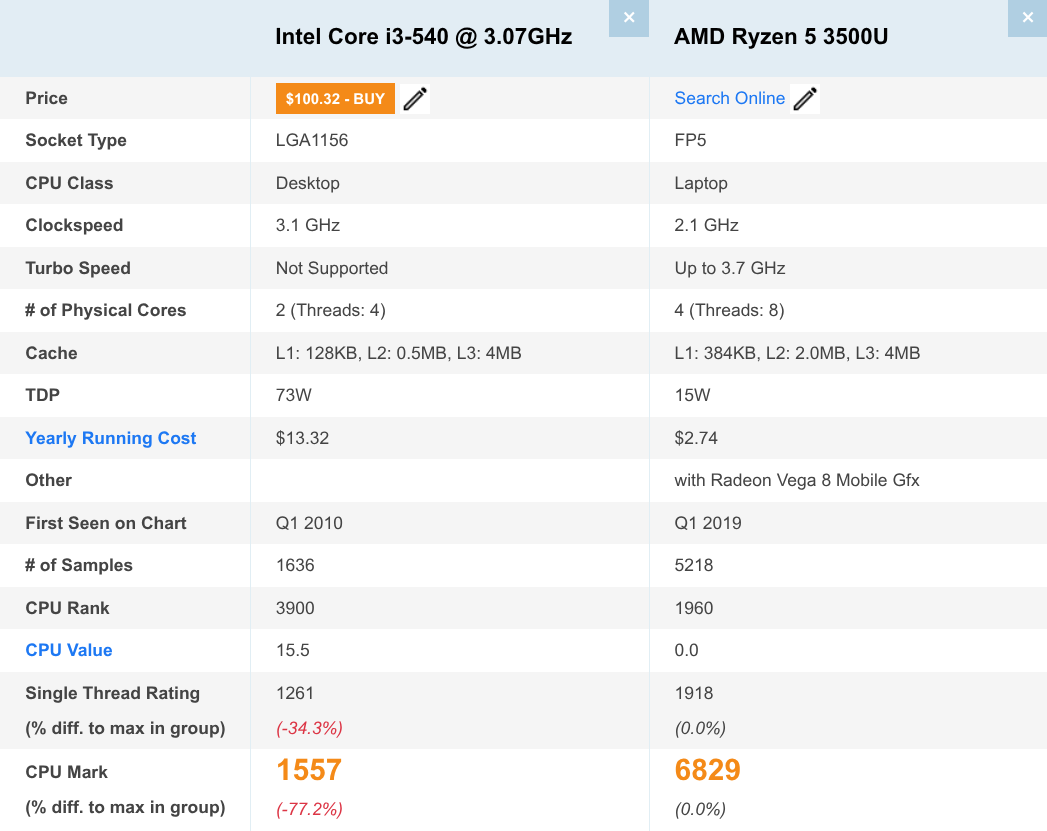
Here is a comparison between my two CPUs:
One of the nice things about having this system is that I am able to truly test how well things run on this garbage can.
Well... That's what I would say if many basic programs actually worked on this machine...
My plan was to set up both my laptop and this old desktop to use the same software. The idea was to use Hyprland as the Window Manager, alongside Noctalia as the Desktop Shell; This combo is lightweight but extremely powerful, just what I needed, but then the problems started.
Hyprland would not start. I remember following the crash debugging instructions on their wiki, and I saw something related to OpenGL on my output, weird. At first I thought my PC somehow didn't have the correct drivers installed, but no, they were installed properly. Hyprland Wiki's solution was to compile Hyprland with the Legacy Renderer activated. I checked all the repositories available on CachyOS and Hyprland with that renderer was not an option.
Also, I didn't find any documentation on what that renderer actually does, for what systems it is useful, or if it gets proper Quality Assurance.
Sorry, but I won't manually Hyprcompile a Hyprgarbage that should work by Hyprdefault. Imagine how frustrating it would be to do all the compiling manually without a working GUI, just to find out it never got QA in 6 months. No, thanks. I ended up switching to Niri and�of course it worked flawlessly. I also discovered that it has some surprising features that, upon discovery, made me like the project more than Hyrpland, for example, the Alt+Tab or built-in screenshot interface. So Hyprthanks for your Hyprbad coding & lack of consideration for people with older hardware, Vaxry.
Unfortunately, that was not the end of the modern developer's vibe-coded wrath upon me.
My preferred terminal is Ghostty, as it has an excellent mix of ease of use, with modern features (like image previews or tiling) and good performance.
But when I ran Ghostty, I got another error related to OpenGL, "Unable to acquire OpenGL context". But the GTK interface worked, the error was shown on the interface, in the place where the terminal is located. I did the same thing as with Hyprland, I searched all over their documentation and other sources and I couldn't find anything meaningful that helped me solve it.
Because I didn't have anything to lose, I tried to run the Kitty terminal and yet again, another OpenGL issue. Fortunately, the Kitty developers were kind enough to mention the minimum OpenGL requirements that Kitty needs to work (OpenGL 3.3).
Another program that failed with a similar problem was Zed. Once again I didn't find any information online, but the obvious suspect is OpenGL.
Ah, funny thing, VSCode works just fine on this CPU, seems like Zed is not yet ready to be a good replacement for Microslopware.
It was at that point that I searched online for what version of OpenGL my i3-540 uses. It runs using OpenGL 2.1. Intel CPUs name their integrated graphics differently from the name of the chips. My i3-540 has a 5th Generation Nehalem iGPU.
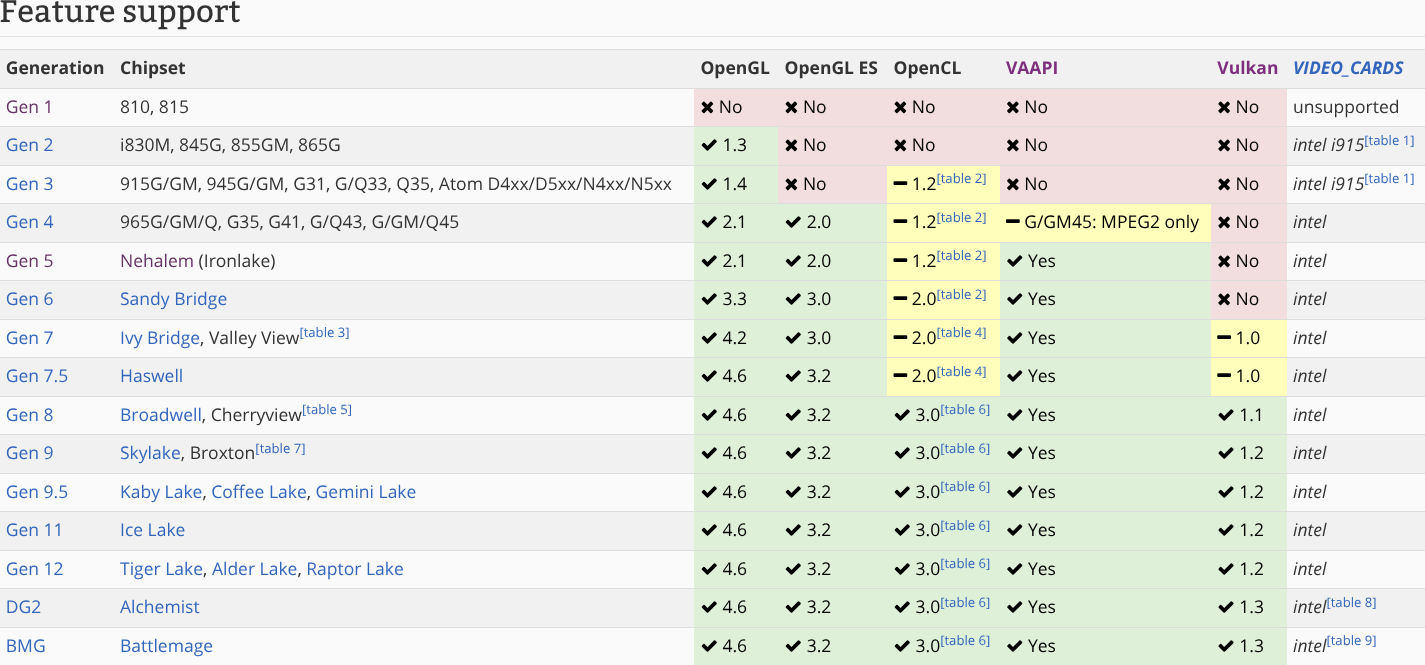
On that graph, you can see that the video drivers are correctly installed inside the Intel Mesa driver. This OpenGL nightmare is not due to my hardware or Operating System configuration being faulty, but due to software not supporting my hardware.
The Bigger Problem

Don't let the Hyprland wiki gaslight you; my Intel i3-540 is not that old, and it works flawlessly for tasks in the range of office + browser workloads. One of the recent trends with hardware is that we are starting to hit diminishing returns, as we are having more and more problems with reducing the size of the hardware to squeeze out more performance. This is why my 16-year-old CPU is able to do lighter tasks without any problems.
Hell, if you paid attention to the performance comparison, you can see that the single core performance difference between my two systems is not that big, in fact the i3 can push the clock speeds higher than the Ryzen without relying on turbo. Quite strange for 9 years of difference. This is the same amount of time between 1999 and 2008, yet the gap in performance gains is considerably smaller.
Now, what other CPUs are from around the same time as my i3? How about some legendary chips like the Core 2 Duo and the Core 2 Quad, alongside more niche mobile and server options. The programs I mentioned don't support CPUs from 2010 and earlier. If you want to see how well these chips can handle heavy tasks, see this video from Budget Builds: Intel's Core2Quad... Finally Obsolete?
You can play GTA 5 and Half Life 2 at 1080p 60fps on a Core 2 Quad, but you can't run a terminal on them...
What I want to know is, what are the practical reasons for these programs to not support the OpenGL versions these chips use? It's not like these chips lack the power to run animations...
On Niri's Github, the developers clearly confirm that this window manager is able to run on the absolutely atrocious Eee PC 900 from 2008 without problems; performance as an excuse is completely ruled out. We can also rule out the programming language of choice, because Niri is built using the modern Rust language, yet it works perfectly fine on the Eee PC.
This is a question of developer comfort versus user comfort. I don't know what is missing from the older OpenGL versions that is so crucial to these more modern programs, but in my opinion, I think these developers are lazy. There are titanic programs like web browsers, games, and other operating system fundamentals (KDE, GNOME, GTK, QT, etc.) that run just fine on these CPUs.
Don't complain that OpenGL whatever is hard to code until you try to make Minecraft run on a Dreamcast like real programmers; grow a pair, you are using low-level languages.
There are people out there that still depend on these older chips to do their daily work. First, they got betrayed by Microsoft, and now they are slowly getting left in the dust by these newer FOSS developers.
Do we live in a mental bubble? Didn't you see the RAM and GPU mafia in action? You have no idea about how many people are locked out of modern hardware due to these price hikes and other unfair situations like low wages in third world countries.
My recommendation is that you avoid using these programs that value "performance" so much. What's the point of performance if it can't help in keeping older hardware running for longer? The logical thing is running faster software on slower hardware.
Just so you know, every single problematic program I mentioned brags about how blazingly fast they are. It seems like they got set ablaze...
I am obviously being painfully sarcastic here. Just mention what the minimum requirement for OpenGL and all other hardware requirements are so people don't waste time installing and debugging software not built for their hardware. I am not diminishing the fact that these developers are still being ignorant assholes for not bothering to support the oldest CPUs that can still do modern-day tasks.
I am this critical because we are talking about software that solves basic tasks. Do you think I would mind if you placed higher hardware requirements to have more modern GPU features in your new monstrous AAA 3D game? By nature, things like a window manager or terminals are on the simpler side when compared to full-blown desktops like GNOME or complex video editing programs that work just fine on these systems.
Then why don't these programs work? I wouldn't be surprised if OpenGL is not the problem here, but then the atrocious error messages of these programs didn't help me at all in figuring out what went wrong.
If your machine still cuts perfect circles 60 years later, why replace it?